Loading...

01 What is the Depth of Market?
The DOM is a highly personalized and experience based tool. Reading the DOM cannot be learned solely through written content. This section covers the fundamental concepts and mechanics, but developing real skill requires extensive screen time, repetition, and live market observation. The DOM is not a pattern based tool. Your job is to read the auction with the DOM like a book. Treat this as a starting point, not a complete guide.
Definition
The Depth of Market (DOM), also called Price Ladder, is a real time display of all resting limit orders at each price level for a given instrument. Unlike Volume Profile or TPO which analyze historical data, the DOM operates entirely in real time. It shows you where liquidity is sitting right now, how fast it is being consumed, and where aggressive participants are willing to transact. From an Auction Market Theory perspective, the DOM visualizes the live negotiation between buyers and sellers, showing where the market is willing to facilitate trade and where participation is absent.
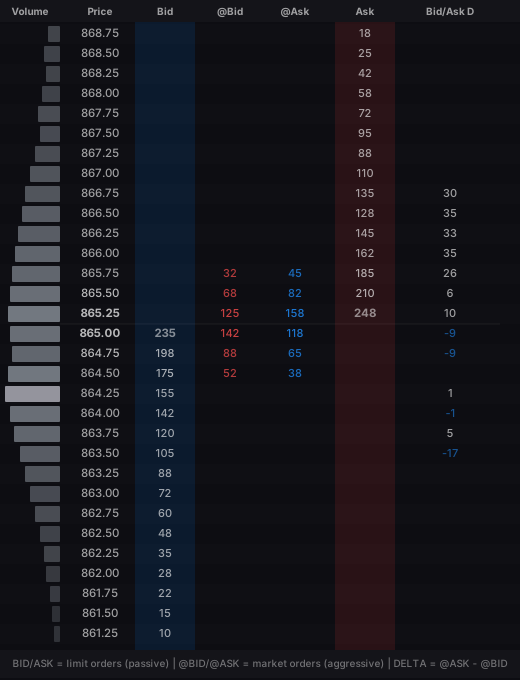
DOM Structure • Source: orderflw.com
How the DOM is Structured
The DOM is organized as a vertical price ladder with the current market price at the center. Each row represents one tick increment. The core columns are: Volume (total contracts traded at each price during the session), Price (the tick ladder), Bid (resting buy limit orders, passive), @Bid (market sell orders hitting bids, aggressive selling), @Ask (market buy orders lifting asks, aggressive buying), Ask (resting sell limit orders, passive), and Bid/Ask Delta (shows how passive participants are repositioning their orders, whether they are pulling or stacking liquidity at each level). The best bid and best ask sit at the center of the ladder, separated by the spread. Everything above the spread shows resting sell orders, everything below shows resting buy orders. These quantities update in real time as orders are filled, cancelled, or added.
Order Types
The DOM displays both passive and aggressive orders. Limit orders (Bid and Ask columns) are passive, they sit at a specific price and wait to be filled, providing liquidity. Market orders (@Bid and @Ask columns) are aggressive, they execute immediately at the best available price and consume that liquidity. A market buy lifts the best ask, a market sell hits the best bid. Price moves when aggressive orders consume all resting liquidity at a price level. If all ask contracts at 5868.00 are consumed by market buys, price moves to 5868.25 where the next resting orders exist. This relationship between aggressive and passive orders is the fundamental engine of price movement.
The Spread
The spread is the difference between the best bid and best ask. In liquid futures markets like ES, it is typically one tick. A stable tight spread indicates healthy balanced participation. A widening spread signals reduced participation or increased uncertainty, often preceding a fast move as market makers withdraw their resting orders.
02 Learning the DOM
There is no shortcut. You learn reading the DOM by watching it live, every single day, for months. Record your screen, replay sessions, and study what happened at key levels. Focus on one instrument and one session. Do not jump between markets. You need to build pattern recognition through repetition, not through theory. The concepts in this section give you a framework, but the skill comes from screen time. Start by just watching without trading. Pay attention to how the numbers behave at levels you identified beforehand. Over time you will start seeing the same sequences repeat. That is when reading the DOM becomes intuitive.
03 Reading the DOM
Liquidity Distribution
The distribution of resting orders in the Bid and Ask columns provides immediate context about market structure. Even distribution on both sides suggests balance. Heavy resting offers stacked above price may indicate resistance. Thin liquidity on one side suggests price can move through quickly. However, visible liquidity must be interpreted with caution. The DOM shows only the current state and this can change in milliseconds. The key question is not "where is the liquidity?" but "how is the liquidity behaving?" Watch the Bid/Ask Delta column to see whether passive participants are adding or removing orders as price approaches a level. Static liquidity that holds firm is more meaningful than liquidity that disappears before being tested.
The concepts explained below will make more sense once you start observing the DOM in real time. Do not worry if the terminology feels overwhelming at first.
04 Key Concepts
Absorption
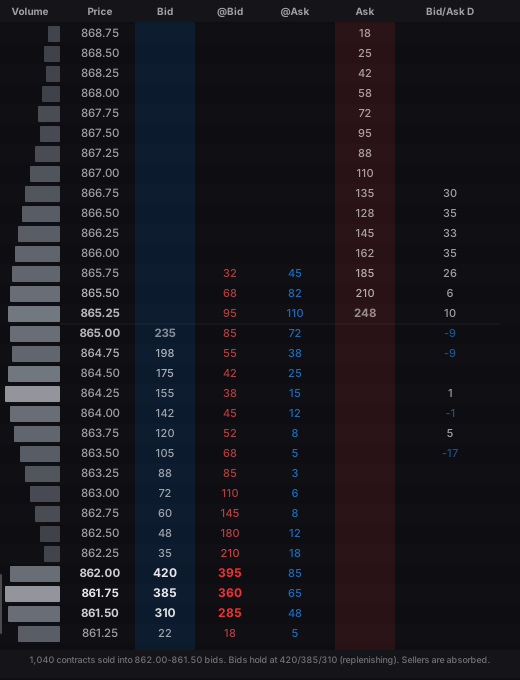
DOM Absorption • Source: orderflw.com
Absorption occurs when a large resting order in the Bid or Ask column defends a price level by absorbing incoming aggressive flow without giving way. You can see it when the @Bid column shows heavy market selling at a level, but the Bid number stays firm or replenishes. The screenshot above shows trapped sellers at the low, heavy @Bid volume clustered into firm bids. However, trapped sellers alone are not absorption. You want to see a response from the buying side: initiation activity, size stepping in, pulling and stacking. Without that buyer response, the sellers may simply reload and push through. Institutions often defend a zone rather than a single price, spreading limit orders across 2 to 4 ticks. When you see consistent absorption across a cluster of ticks at a structural level like a value area boundary, prior POC, or VWAP, it combines real time orderflow confirmation with established auction context. Video examples of absorption in practice are found below in the YouTube section.
Exhaustion
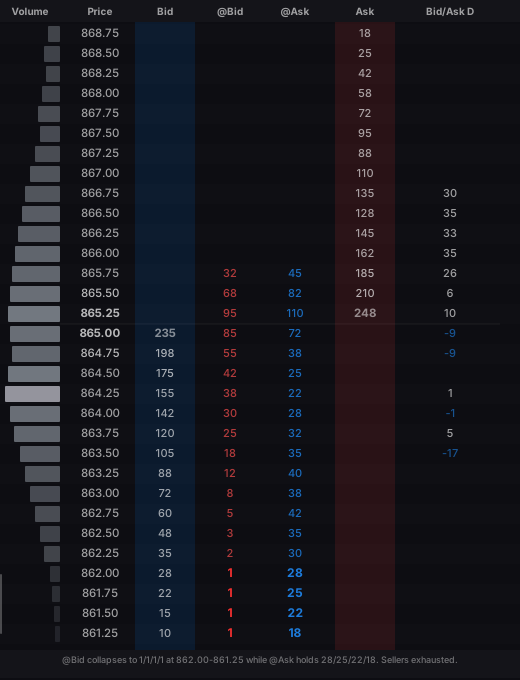
DOM Exhaustion • Source: orderflw.com
Exhaustion shows that the aggressive side has run out of participants. The screenshot above shows @Bid (aggressive selling) collapsing to single digits and zeros at the low while @Ask (aggressive buying) maintains healthy levels throughout. However, thin aggressive flow alone is not exhaustion. You want to see it after a sustained directional move, and you want confirmation from the other side in the form of initiation, size, pulling and stacking. During choppy rotational conditions thin flow is noise, not a signal. The pattern should persist for more than a few seconds, otherwise it is likely just a brief liquidity gap. Exhaustion is the complement of absorption: absorption shows a passive participant defending, exhaustion shows the aggressive side losing momentum. Both together provide strong evidence that the current directional auction is concluding. Video examples of exhaustion in practice are found below in the YouTube section.
Pulling and Stacking
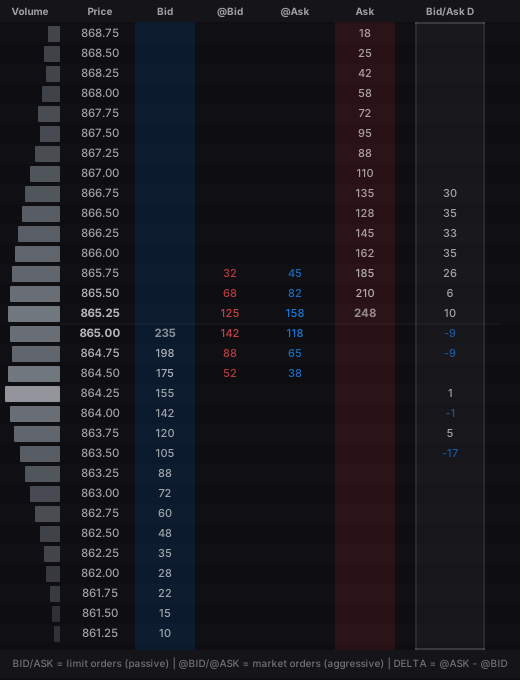
DOM Pulling and Stacking • Source: orderflw.com
Pulling and stacking is visible through the Bid/Ask Delta column. Pulling occurs when resting orders are removed (delta goes negative on the bid side or positive on the ask side), signaling reduced confidence. Stacking occurs when orders are added, building genuine support or resistance. When asks are pulling ahead of price while bids are stacking behind, the market is clearing a path for price to move higher. A pull/stack flip is when this dynamic suddenly switches sides at a key level, for example buyers dominating then flipping to sellers stacking as price reaches resistance. Do not use pulling and stacking alone. It is most significant when combined with other confluences like absorption or exhaustion.
Spoofing
Not all order placement represents genuine intent. Spoofing involves placing large fake orders in the Bid or Ask column with the intention of cancelling them before execution. The tell is that large orders appear suddenly and disappear when price approaches without ever getting partially filled. Genuine large orders almost always show partial fills in the @Bid or @Ask columns. Developing the screen time to distinguish routine algorithmic behavior from meaningful orderflow is essential.
Iceberg Orders
Iceberg orders are large institutional orders broken into smaller visible portions. Only a small tip is displayed in the Bid or Ask column while the full order is much larger and automatically replenishes. The tell: the Volume column shows heavy trading at a level, the @Bid or @Ask column shows significant aggressive flow, but the resting Bid or Ask number keeps refreshing to a similar size after each fill.
Finished Auctions
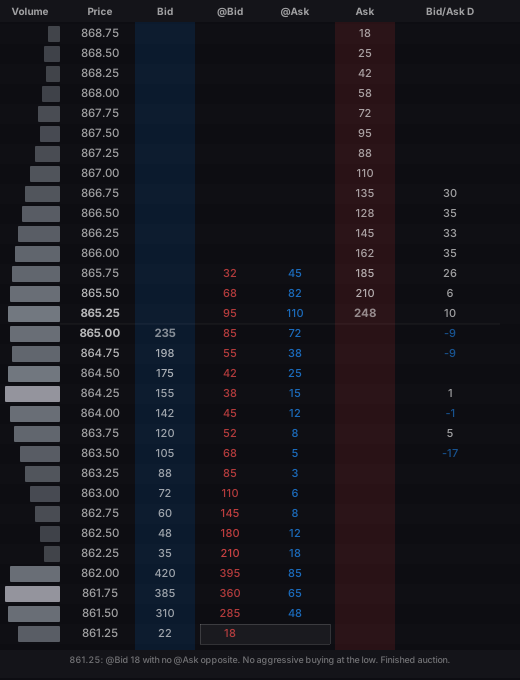
DOM Finished Auctions • Source: orderflw.com
Finished auctions mean the current move is completed, possibly confirming a mean reversion. The screenshot above shows @Bid 18 at 861.25 with no @Ask opposite. No aggressive buying at the extreme low means no one is willing to buy there anymore, the downside auction is finished. In bearish scenarios you look for the same in reverse: @Ask alone at the high with no @Bid opposite. Finished auctions appear quite often and then fail again, so never use them alone. On their own they do not tell you anything. They are just a nice additional confluence when combined with some kind of auction story.
05 Combining Context with Execution
The DOM provides real time confirmation of the market state identified through structural tools. When Volume Profile or TPO suggests price is approaching a key level, the DOM reveals how participants are actually interacting with it. If the DOM shows absorption at a support level with aggressive selling diminishing, you have convergent evidence that the level will hold. If resting bids are being pulled and aggressive selling is accelerating, the structural level may fail. Context tells you where to look. The DOM tells you what is actually happening there. This is one of the most powerful analytical frameworks available: use Volume Profile and TPO to identify levels, then use the DOM for real time confirmation and precise execution timing. The DOM is a skill that requires extensive screen time to develop. Record your sessions and review them to build pattern recognition. Specialize in one market, as each instrument has distinct microstructure characteristics.
06 YouTube Channels
These channels regularly post DOM replays and in depth orderflow education. More DOM replay content can be found in the DOM replay channel in the FLW Discord.


07 YouTube Videos
DOM Absorption
DOM Exhaustion
Pulling and Stacking
More DOM Examples
Pull/Stack Flips
Finished Auctions
DOM Execution
Interactive: DOM Anatomy
Click a button below the chart to explore each column.
Click a button below the chart to see its description.
Test Your Knowledge
1 / 5What is the difference between the Bid/Ask columns and the @Bid/@Ask columns?